Project management
Know where every project stands, and what needs you next
A project in Soft-TLS is more than a name and an address. It holds who is responsible, the results that must be accepted, the plan and the forecast, and whether the people on it meet the requirements. A small firm gets a short path through it; a larger one gets the depth.
The problem today
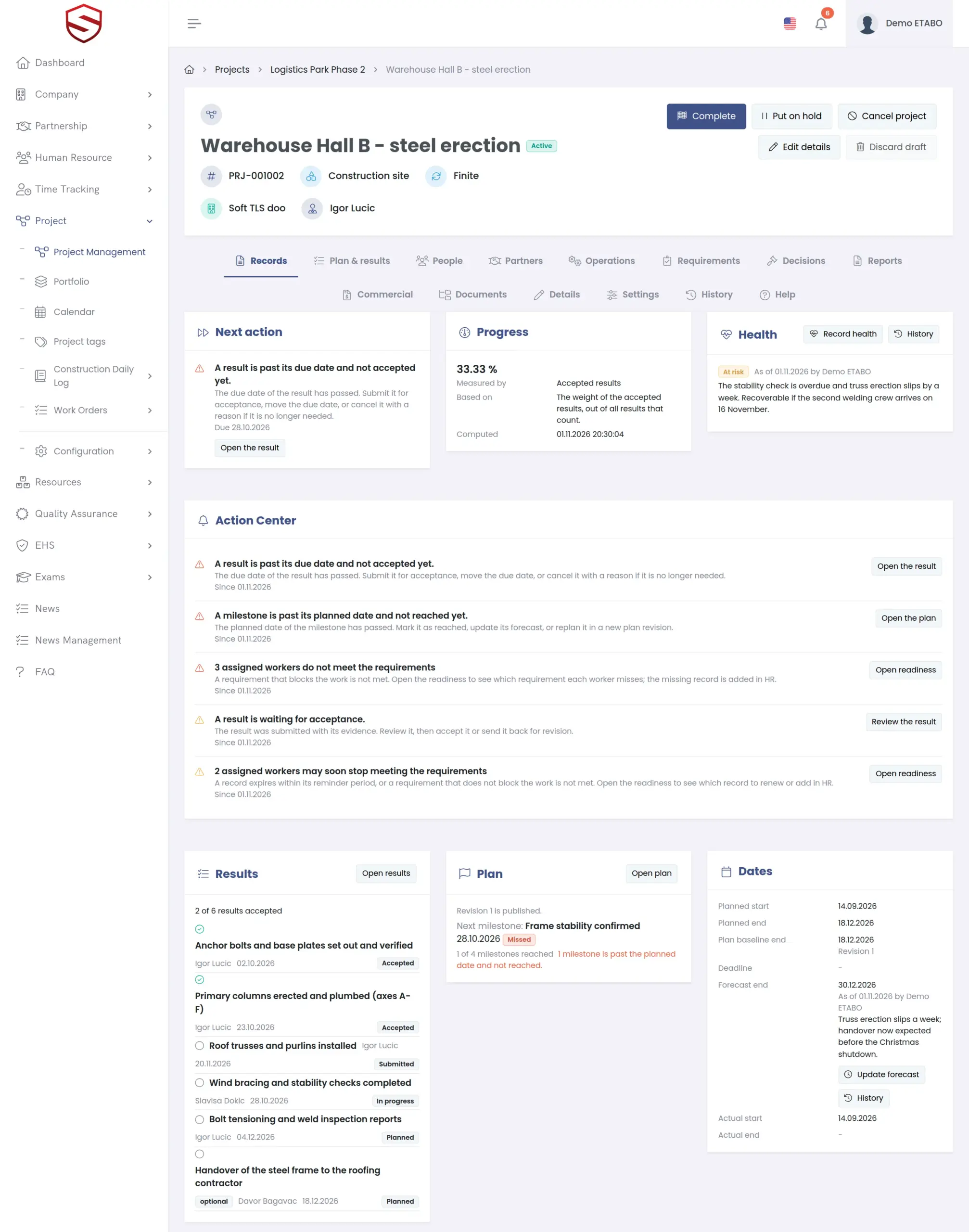
A project folder cannot answer the questions you actually ask
Progress is a feeling
A bar stuck at 70 percent, or a phone call, is not progress. Nobody can say what was delivered, or who agreed that it was done.
Responsibility is vague
Everyone who can open the project is called a manager. Months later nobody can say who was actually in charge in March.
Readiness is found out on site
A welder’s certificate expires in the middle of the month, and the office learns about it when the work has already started.
Results and acceptance
Progress means results that somebody accepted
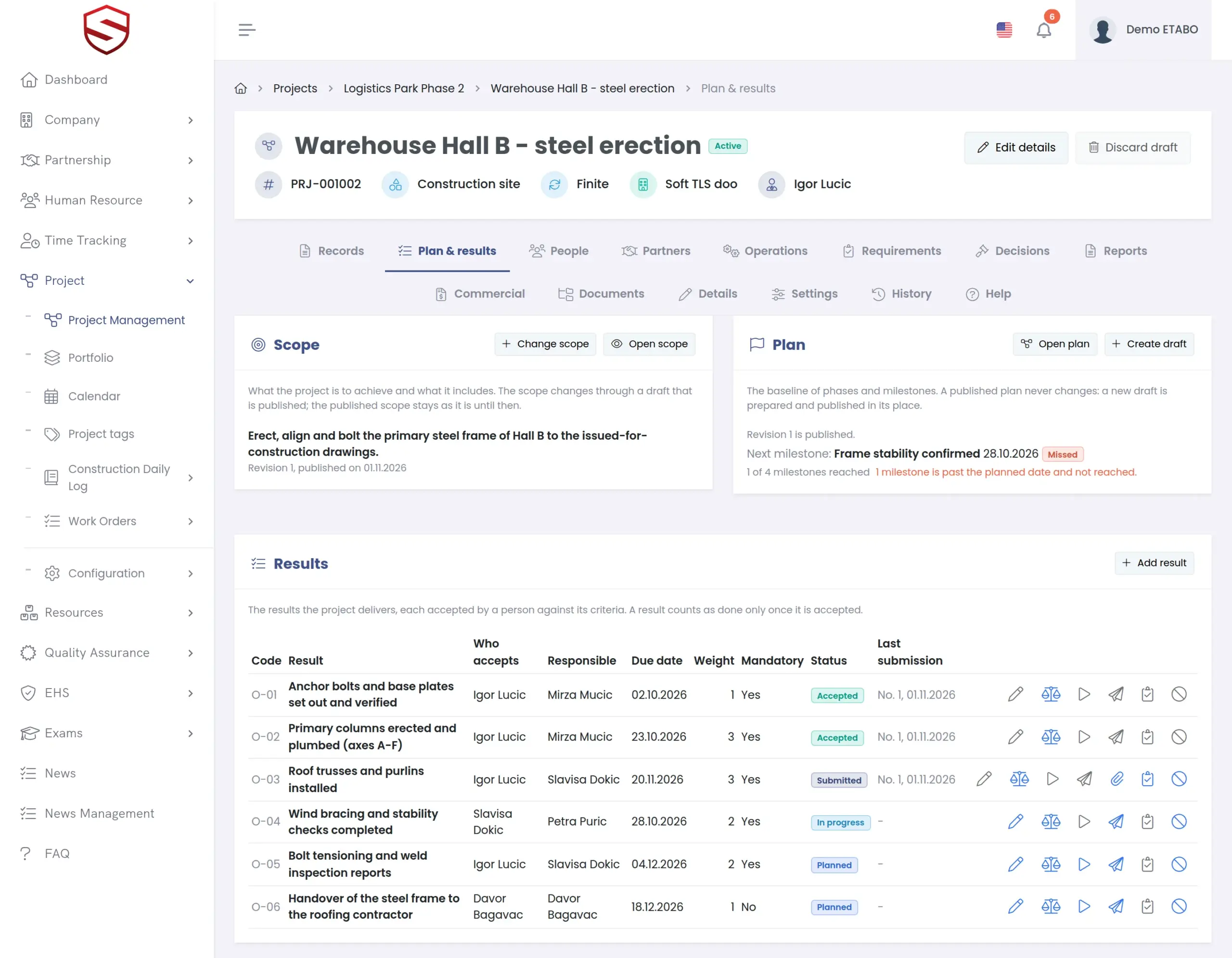
A result is something the project must deliver and somebody must accept: an electrical installation accepted by the supervisor, ten workers trained for work at height, a service report signed by the customer. The person responsible submits it with evidence, and the named acceptor accepts it or sends it back with a reason.
Progress then reads plainly: 3 of 5 results accepted. When nothing can be measured, the project says so instead of showing zero percent.
- Submit with evidence: a document, work order, daily log entry, link or note. Every submission is numbered and kept
- Accept, or send back for revision, with the decision on record
- Weights and mandatory results for projects that want them
- Progress as accepted results, as a manual assessment with your name and date, or not tracked at all
Plan, forecast and health
What was agreed, what is expected now, and how it is going
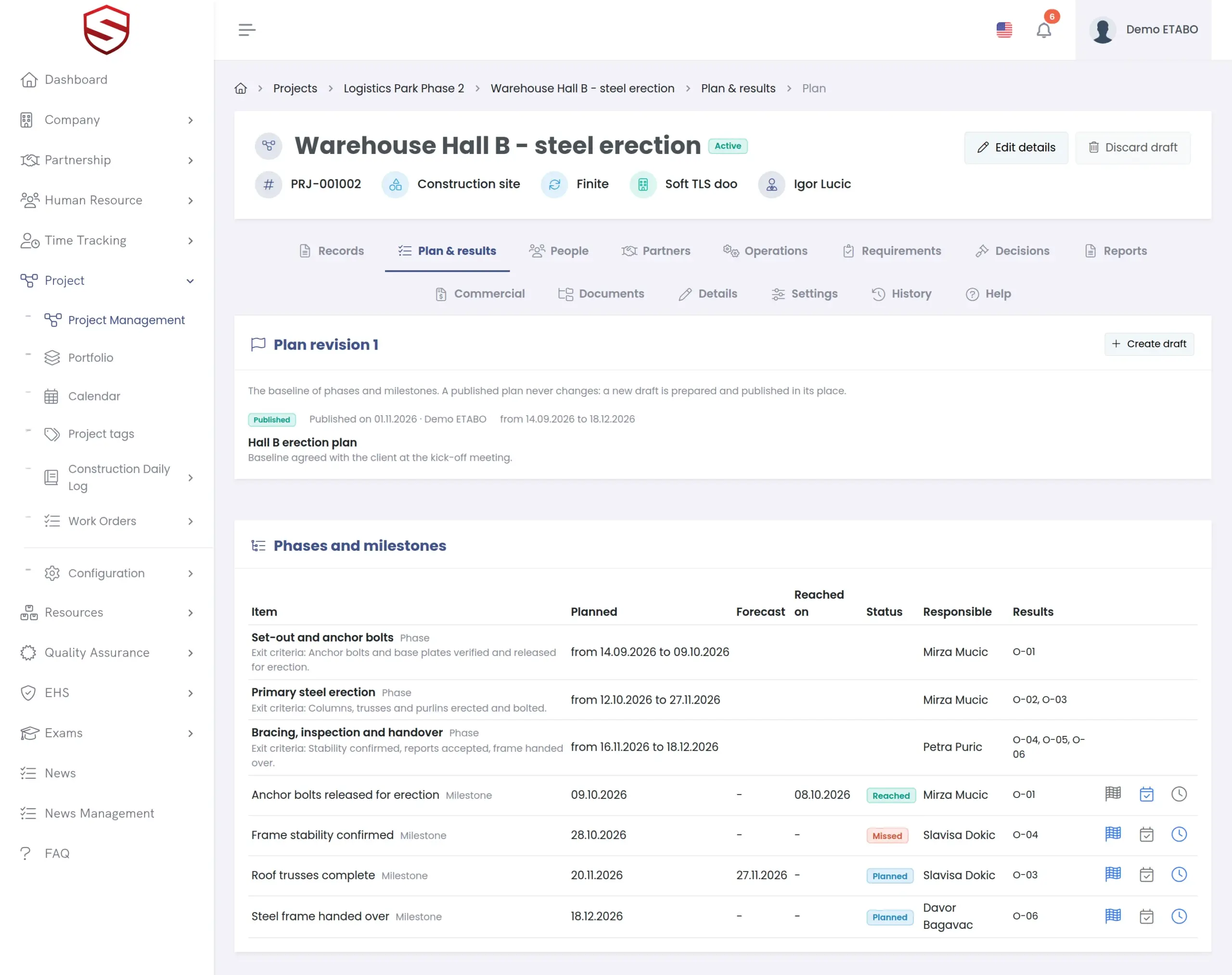
A published plan with phases and milestones is the baseline, and it is never edited: a new version replaces it and the old one stays in the history. The forecast moves as often as reality does, and every change is remembered with who made it.
Health is the project manager’s own assessment, on track, at risk or critical, with a date. It is shown next to the plain facts, such as overdue results and missed milestones, so an old green mark cannot hide a missed deadline.
- Phases, milestones and dependencies, and a comparison of a draft with the published plan
- Milestones marked reached, missed or cancelled, each with its own forecast date
- Forecast and health with history, never overwritten
- The planned end date and the baseline stay as they were agreed
Status reports and decisions
What was known in March stays in March
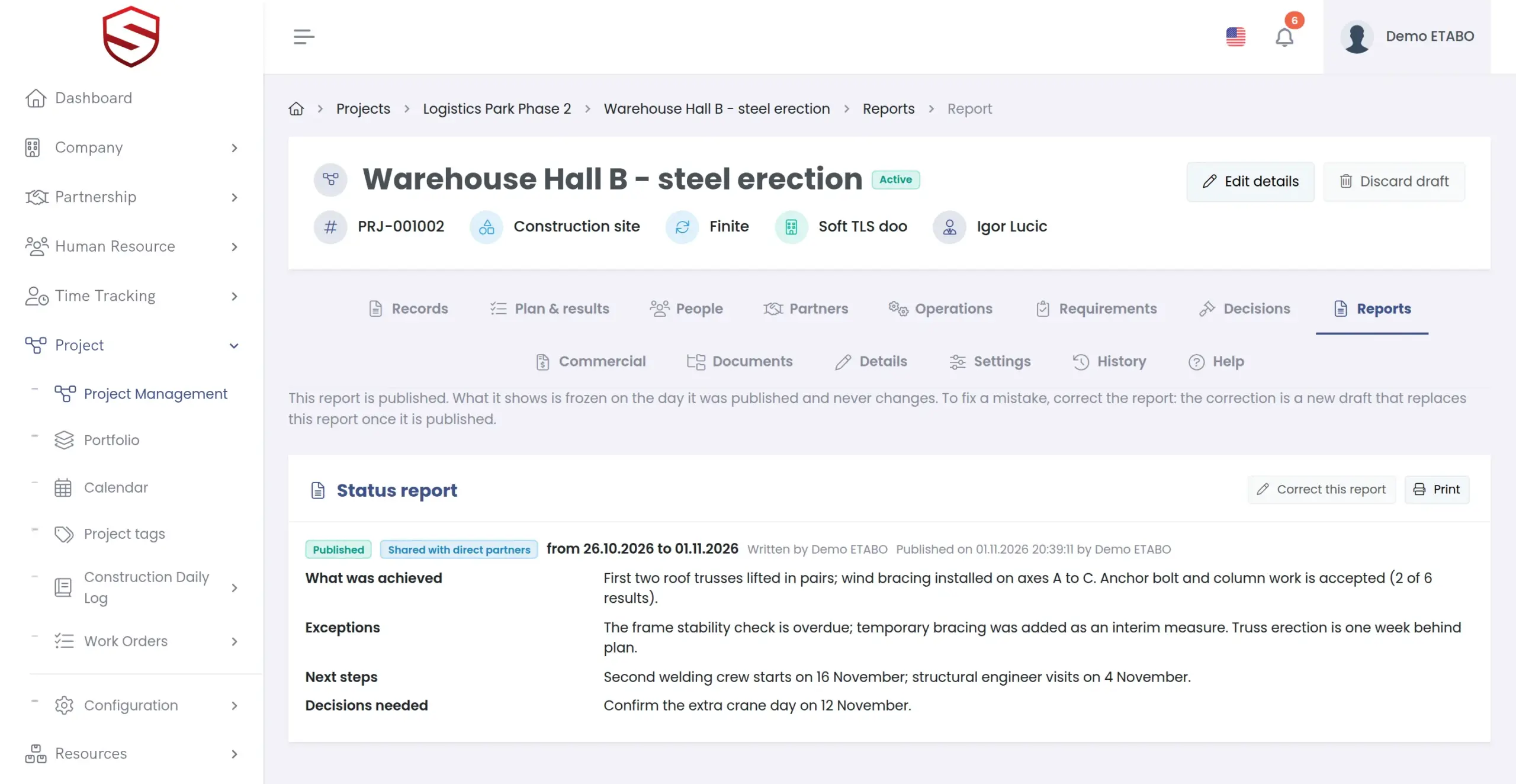
A status report states what was done, what went wrong, what comes next and what needs a decision. Once published it is frozen. If something was wrong, a corrected report replaces it and points to the old one, so you can always see what the manager knew and claimed at the time.
Decisions are recorded the same way: the question, the options, what was decided, why, by whom and from when. They are not edited. A later decision supersedes an earlier one, and both stay visible.
- Reports weekly, every two weeks or monthly, with a reminder to the person responsible
- Reports shared with partner companies never show money
- A PDF of a report for the client file
- Accepted results, approved changes and exceptions leave their own decision entries
Lifecycle
Start, pause and close a project on purpose
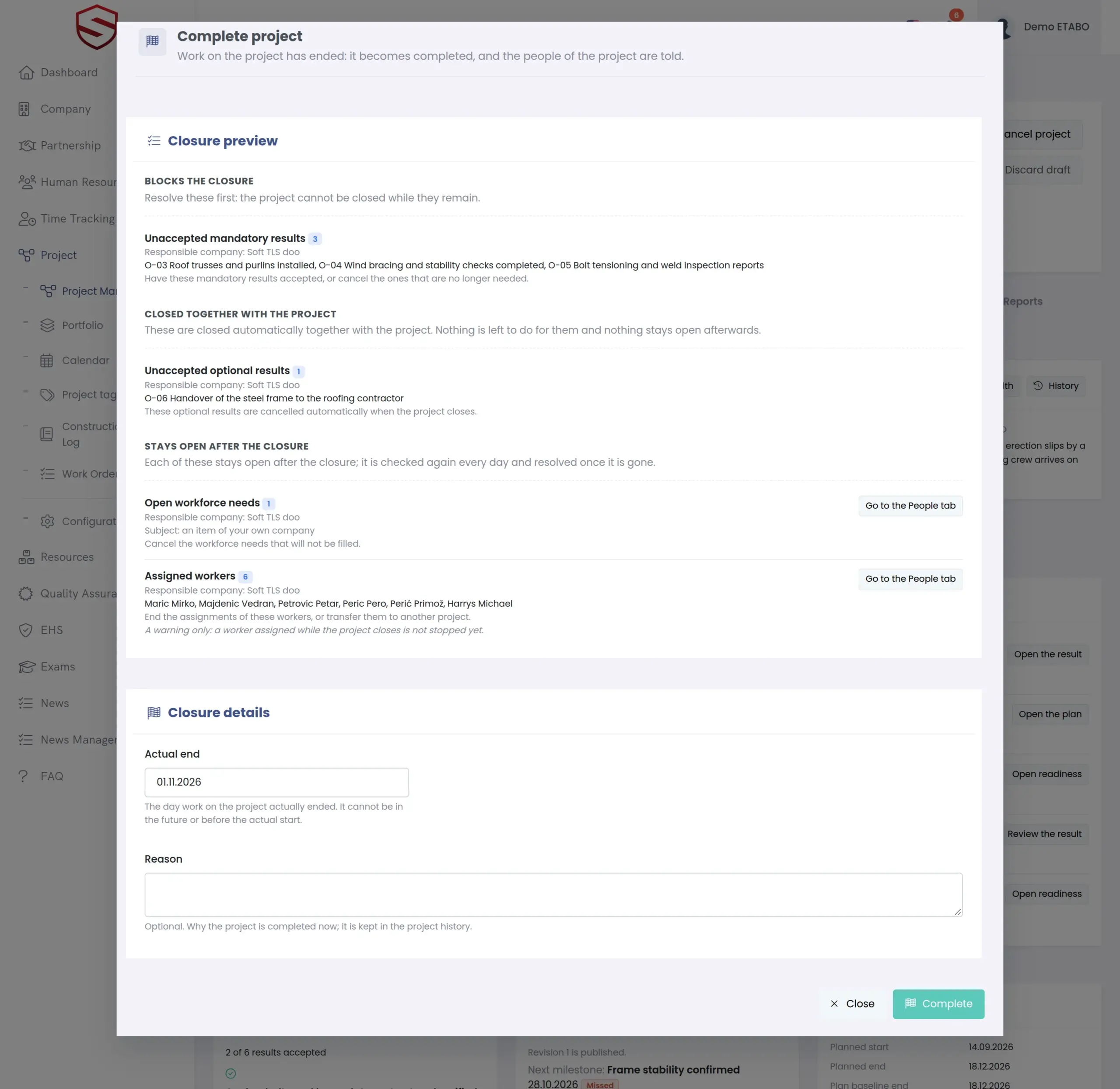
A project is planned, active, on hold, completed or cancelled, and archiving is a separate, reversible step. Before a project is completed or cancelled, the closing review shows what still blocks it, such as open work orders and tasks, unaccepted mandatory results or open sub-projects, and what stays open afterwards as an obligation with an owner, such as assigned workers or delegations.
Overdue results and milestones show up in the list of things that need attention. Nothing closes a project by itself.
- Activate, put on hold, resume, complete, cancel, reopen, archive and restore
- A closing review that separates blockers from obligations that stay open
- Closing despite a blocker is a recorded exception with a reason, never silent
- A planned project created by mistake can be discarded
People and readiness
Who is responsible, and can this worker go to site
Being able to see a project, being responsible for it and working on it are three different things. Responsibility has a role, such as principal, deputy, operations lead, HSE lead, commercial lead or acceptor, and a period, so the history of who was in charge is kept.
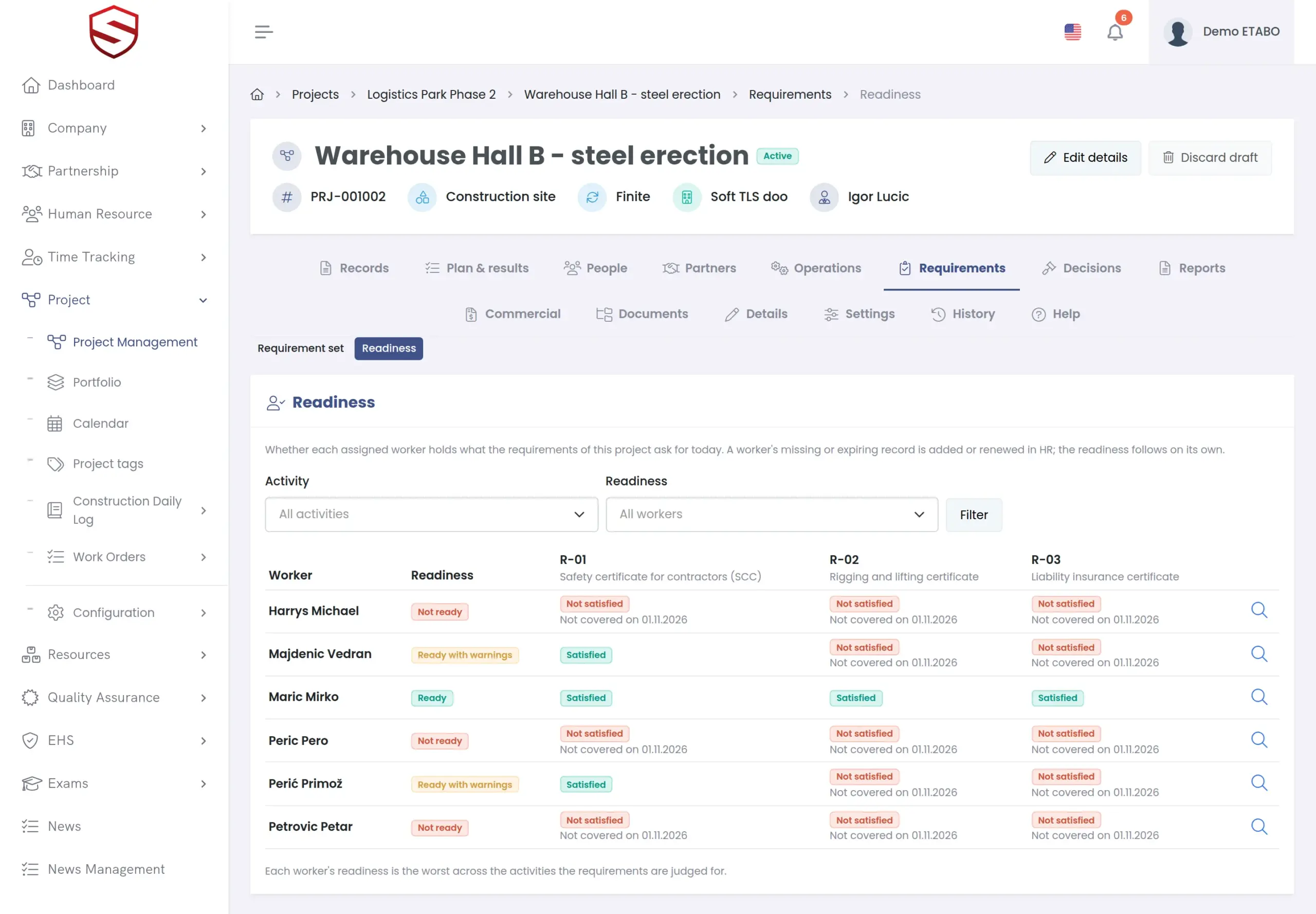
A project can state what people on it must have: a certificate, a training, an HR document, a company certificate or a document reviewed by hand. Readiness is judged for the whole period of the work, not only today, and it reads ready, ready with warnings, not ready or unknown. Unknown is never taken as fine.
- Responsibility with roles, periods and history, separate from membership
- Requirements that apply to all assigned workers or to chosen workplaces
- The application warns when a worker does not meet a requirement and shows exactly which one is missing
- An exception is limited to a person, an activity and a period, needs a justification and a compensating action, and is recorded as a decision
- Workforce need: how many workers of which kind the project will need, and when
Requirements are checked against the certificates and documents kept in HR.
Needs attention
A list of what needs you, instead of counters
Action Center
On every project: a result waits for your acceptance, a milestone is four days late, two workers are not ready, a change waits for a decision, nobody is responsible. Each item opens the place where it is solved.
Email digest
A daily or weekly summary of the projects you can see: open findings, overdue items and what is due in the next seven days. Each user turns it on for themselves, and nothing is sent when there is nothing to report.
Dashboard and calendar
Dashboard widgets count active projects, projects needing attention, overdue items and projects at risk. The project calendar shows the milestones of published plans.
Portfolio
Compare projects side by side
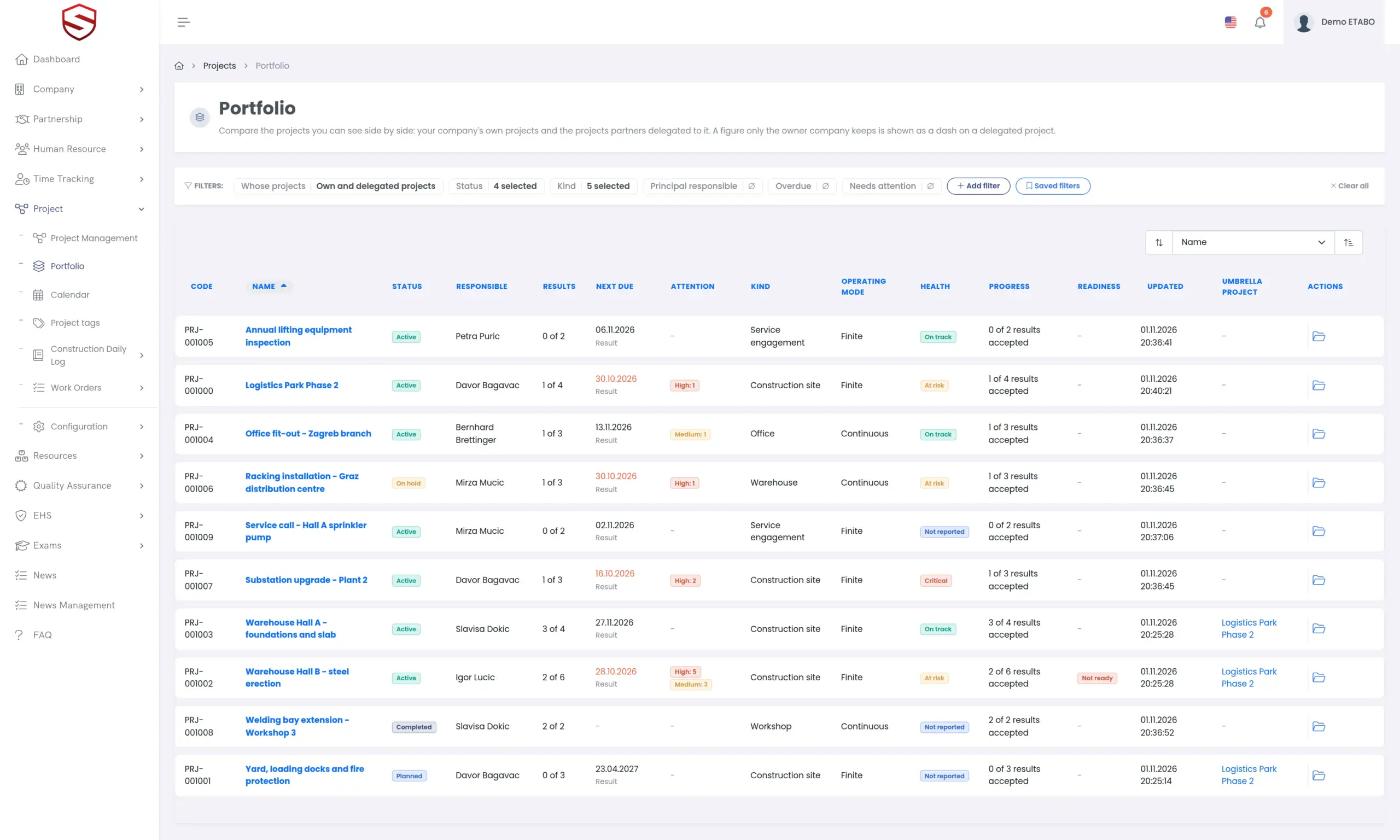
The portfolio puts your own projects and the ones delegated to you in one table: status, who is responsible, results, what is due next, what needs attention, and, depending on the profile, health, progress and readiness.
Each project’s progress stays in its own measure and is never averaged into a single number.
- Filters by status, kind, whose projects, health, readiness, umbrella project, planned period and tags
- Saved filters, personal to each user
- Tags for grouping projects any way you like, visible to your company only
- Read only: it adds no access to projects you could not already open
Umbrella projects and partners
Programs, sub-projects and subcontractors
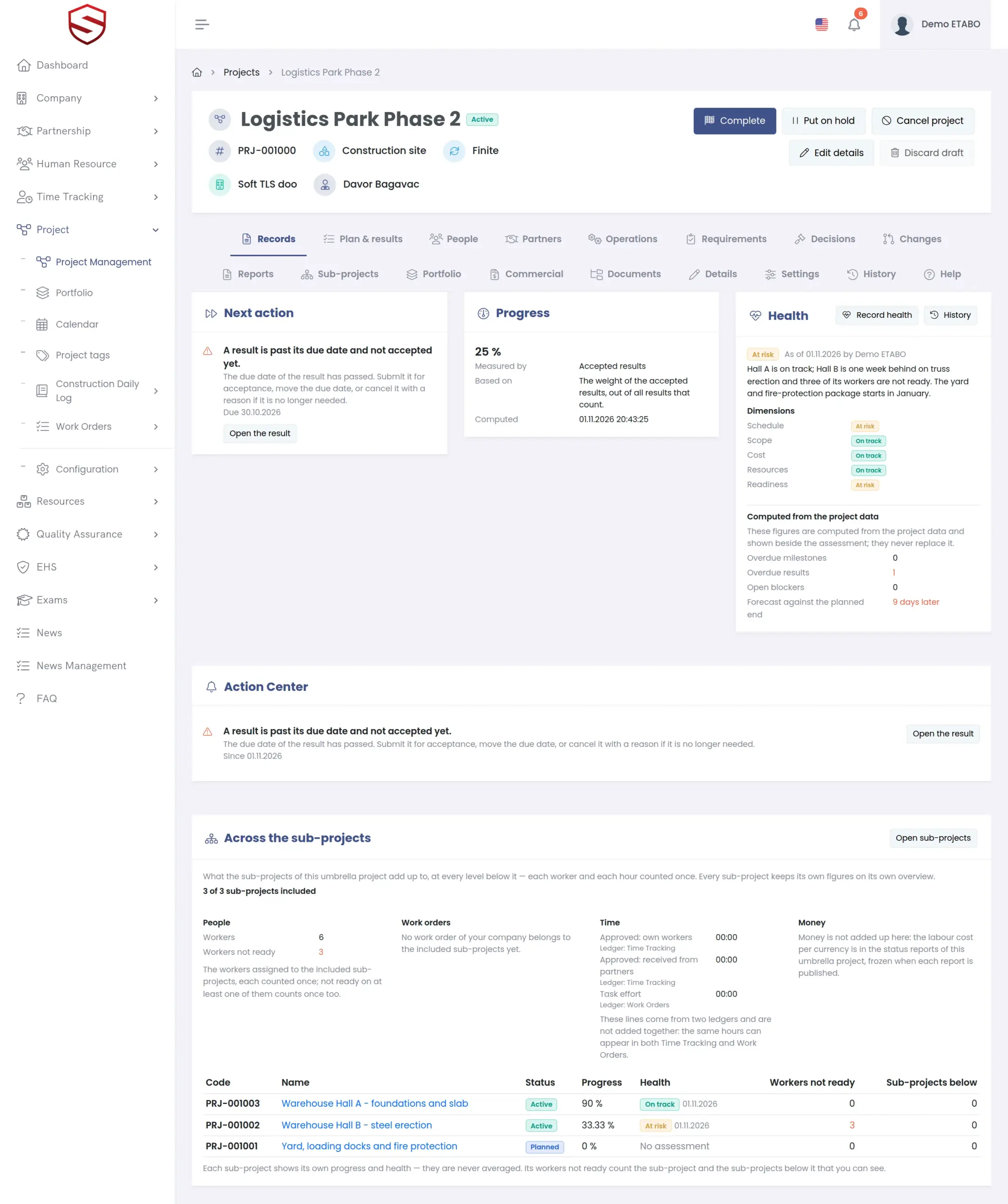
An umbrella project groups sub-projects, plans and sets requirements for all of them, and hosts no work of its own: workers, work orders and equipment belong to the operational sub-projects. It adds up workers, work orders and hours across the sub-projects, and shows each sub-project’s progress and health separately. Money is never added across projects.
Work can be delegated to a partner company. The partner sees its own results, decisions and reports shared with it, and manages its own people. Internal notes, costs and the commercial tab stay with the owner of the project. When a result is delivered by a partner and decided by the owner, the decision is recorded as a client acceptance.
- Convert a project to an umbrella, attach, move (with a reason) and detach sub-projects
- Requirements pass down to sub-projects, which can tighten them but not loosen them
- A commercial tab shows contracts, invoices and payments from the partner network, per currency, never converted
- Documents with folders, versions and sharing with direct partners
See also subcontractors and the partner network.
Three profiles
Simple for a three-person firm, deep for a large one
A profile decides how much of the project the screens show. It changes no rule, no permission and no data. Raising it asks for nothing new, and lowering it never hides a section that already holds something.
Basic profile
Create a project with just a name. Add results with who accepts them and when they are due, keep a short list of milestones, accept, and close. No plan, no reports, no approvals unless you want them.
Standard profile
Adds the published plan with phases and milestones, acceptance criteria and weights, forecast and health, status reports, partners, requirements and readiness, and workforce need.
Advanced profile
Adds umbrella projects and sub-projects, change approvals, the portfolio’s umbrella and tag filters, health by dimension and a full plan history.
Also included
For the projects that need more
Changes that need approval
A company can require approval for changes to a published plan, to requirements and to moving sub-projects. The change waits for an approver, who applies or rejects it with a note. All three are off until you switch them on.
Recurring projects
An annual overhaul or a training cycle can run in cycles with their own results and periods. Progress counts the active cycle, and a cycle cannot be left open when the project closes.
Existing projects carry over
Workers, work orders, hours, equipment and documents stay connected. Projects whose old status cannot be translated reliably wait in a “Status to be confirmed” list for someone to decide.
Works together with
Work orders and daily log
Work orders and tasks belong to a project, and a result can point to them as evidence. The daily log records what happened each day.
Time tracking and HR
Hours booked on tasks count on the project. Certificates and training in HR are what readiness is judged against.
Equipment and HSE
Equipment is allocated to the project, and risk assessments and incidents belong to the project where they happened.
Frequently asked questions
Do small companies have to use all of this?
No. A new project needs only a name, and the Basic profile keeps the screens short. Everything else is there when you need it and is not asked for before.
Is this scheduling software with a critical path?
No. Plans have phases, milestones and dependencies, but Soft-TLS does not calculate a critical path or level resources automatically. It is built to show where a project stands and who is responsible, not to optimise a schedule.
Will the application stop me from assigning a worker whose certificate has expired?
Today it warns you and lets you continue. The worker is shown as not ready for the period in question, and the project’s Action Center lists them until the requirement is met.
Does a project end by itself when its end date passes?
No. Overdue results and milestones show up in the list of things that need attention, but a project is completed or cancelled by a person, after a closing review.
What do partner companies see?
Only their direct counterpart, the results assigned to their own people, and the decisions and reports that are shared with them. Internal notes, costs, requirements, changes and the commercial tab stay with the project owner.